New records without an IT queue
The people who know the process design the structure on screen, publish versions and keep the data dictionary.

One record per item, checked at entry, cared for by the people who know it and delivered to the systems you already use. On screen, through integration or by an AI agent.
A trial account with its own database. No credit card.
The same item, as it arrives from three places
One record. The merge can be undone.
The same product spelled three ways, the same supplier registered twice, and each team with its own spreadsheet. The error only shows up once it has reached an order.
The supplier exists twice, with two codes, and each purchase picks one.
They accept anything: a tax ID with letters, a date in the future, a required field left blank.
Each team edits what it needs, and nobody answers for the whole record.
Who changed it, when, and what was it before? Without history, a mismatch becomes an investigation.
So master data is born right, has an owner and reaches every system the same way.
The people who know the process design the structure on screen, publish versions and keep the data dictionary.
Steps per team, with deadlines, roles per domain and an owner for the data. Everyone sees what is waiting for them, and reviewing what has already been completed also goes through steps.
Rules that block or warn, text standardized as it is saved and data quality measured every day, with a goal for each master data set.
Unique keys at save time, similarity-based duplicate suspicion and merging with history that can be undone.
The ERP and other systems receive checked data and send what is theirs. When two sources disagree, the trust you give each one, field by field, decides — or it becomes a proposal, never an overwrite.
An agent works through the MCP protocol with the same rules as the screen and reaches only what its key allows.
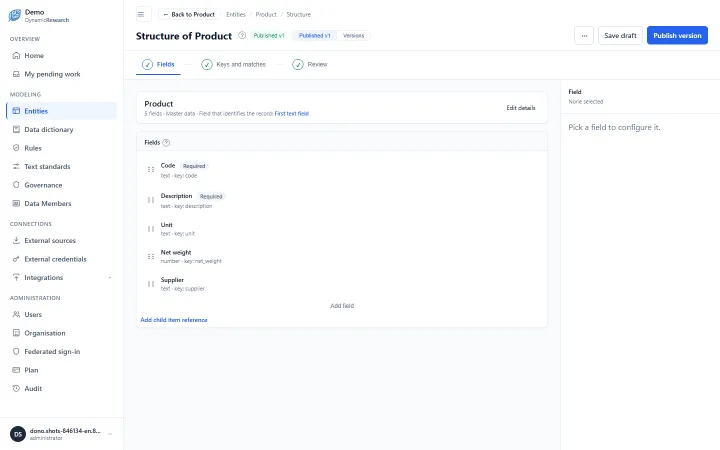
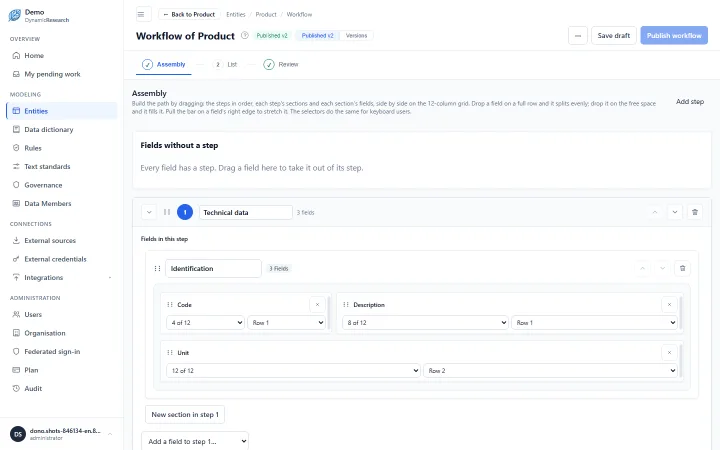
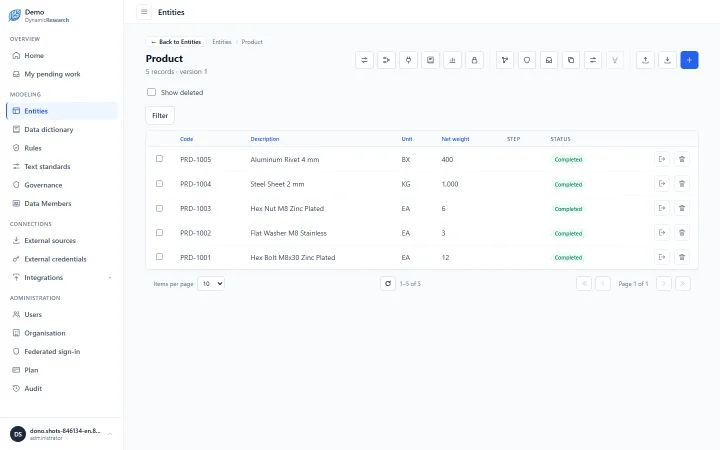
You start with one entity and grow from there, without stopping operations.
Design the record on screen: fields, rules and unique keys. Publish when it is ready.
Say which team fills in each step. Each person sees and edits only their part.
Import today's spreadsheet, checked row by row, and connect the systems that feed and consume the records.
See data quality day by day, who changed what and the version history of each record.
Any data that several teams use and none can get wrong. Three common situations:
Product master data
Engineering describes it, purchasing completes it, tax checks it. Each team fills in its step, and the item only becomes available once all of them finish.
The item is born complete, and each part has an owner.
Supplier master data
The supplier is registered and checked once. The ERP and other systems receive the finished data, each with its own code.
Change it here, and the systems find out.
Customer master data
Unique keys block the exact repeat, and similarity points out the near-duplicate for someone to decide. Old duplicates are merged with history.
One customer, one record, and the merge can be undone.
It also works for assets, beneficiaries and non-conformance records: any record that several teams use and that lives in a spreadsheet today.
In a trial account, you import the spreadsheet and watch the records gain rules, an owner and history.
Physical isolation, your company's identity and a record of everything that changes.
Each organization has its own database and its own credentials. A neighbor's data is in another database, not behind a filter.
Sign-in through the organization's identity provider (OIDC). The provider confirms who the person is; what they can access is decided here.
Suspending someone or changing their role ends that person's sessions immediately.
Who designs, who operates, who curates and who answers for the data, by organization, domain or entity.
Every change records who made it and what changed, and every version says how it came in: screen, import, system or agent.
Database passwords and integration credentials are encrypted, and no screen or API returns them.
How we handle personal data: privacy policy
MDM sits in the middle: it receives data where it is born, checks it and delivers it to whoever consumes it. The ERP keeps running.
Each system with its own code. When the source and the record disagree, the field-level trust policy settles it, or it becomes a proposal for someone to decide; the record shows the value each source sent.
Webhooks on every record completed, changed or deleted, and a feed for those who prefer to read at their own pace.
Spreadsheets checked row by row before saving; output in Excel, CSV or JSON.
The same rules apply to the screen, the integration and the agent. There is no ready-made connector for a specific ERP: integration is over HTTP.
A trial account with an address of its own, a database of its own and whatever structure you design. Small on purpose: it is there to prove the product, not to run on for free.
Every request goes through a quick check on our side before the account is created — nothing is provisioned automatically. We get in touch on the number you gave us with the address and the first administrator's password.
It means keeping the records the whole company uses, such as products, suppliers and customers, in one place, with rules, an owner and history, and delivering them the same way to every system.
No. The ERP keeps running; what changes is where the records it consumes come from. The platform is where data is born, checked and versioned, and integration carries it from here to there.
In three layers: unique keys block the exact repeat at save time, similarity points out the look-alike for someone to decide, and old duplicates are merged with history. The merge can be undone.
No. The structure is designed on screen by the people who know the process, and publishing creates a new version without changing what has already been filled in.
Yes, both ways, over HTTP: sync with source systems, notices on every change, a change feed, spreadsheet import and export to Excel, CSV or JSON. There is no ready-made connector for a specific ERP.
Yes, through the MCP protocol, with a key you create, limit and revoke on screen. It follows the same rules as the people filling in and only runs the operations granted to it.
In a database that belongs only to your organization, with its own credentials. Database passwords and integration credentials are encrypted.
Yes, through your organization's identity provider (OIDC). The provider confirms who the person is; groups and roles are still defined in the platform.
It depends on how many records, people and connected systems you need. Talk to us through the contact section, or start with the trial account.
Tell us what you need to manage. We reply to the same address you leave here.
Nothing you write here is stored in a database: the message becomes an email in our contact inbox.